

The best wired headset for working from home is the one that fits your computer, room and calls. For a solo business, start with the ports on your machine, the noise around your desk and how long you need to wear it.
In a relatively quiet room on a tight budget, consider the Logitech H390 or H391 with the right plug. The Poly Blackwire 3220 adds a USB-C connection, an included USB-A adapter and inline controls. The Logitech Zone Wired 2 is worth considering when you need less noise in your own listening space. The Razer BlackShark V2 X serves a separate need: one headset for work and gaming.
These four groups address different situations. Start with the one closest to your desk setup, then check its limitations before buying.
On this page
- Best wired headset for working from home: quick picks
- How we researched these headsets
- Four wired headset groups worth considering
- Five checks before choosing a wired headset
- A five-minute setup check before a client call
- A short checklist before buying
- Wired headset FAQ
- Choose a branch, then check the exact version
Best wired headset for working from home: quick picks
USB-A vs USB-C, briefly: USB-A is the familiar rectangular connector. USB-C is smaller, oval-shaped and reversible. The connector name identifies the plug; it does not by itself establish audio quality or every supported function. Dell explains connector types and USB versions.
| Your main need | Start here | Connection of the version covered | Main trade-off |
|---|---|---|---|
| Desk calls in a quiet room, with a low budget | Logitech H390 / H391 | H390: USB-A; H391: USB-C | Choose the correct plug; check comfort for longer meetings |
| Moving between USB-A and USB-C computers | Poly Blackwire 3220 | USB-C with an included USB-A adapter | Check configuration 9P7X8AA and controls in your meeting app |
| Hearing less background noise in a shared workspace | Logitech Zone Wired 2 | USB-C with an included USB-A adapter | ANC helps the wearer; microphone performance is a separate question |
| One headset for work and gaming | Razer BlackShark V2 X | 3.5 mm | Your connection must support both headphones and microphone |
ANC means active noise cancellation: microphones and electronics reduce noise that the wearer hears. A noise-reducing microphone serves the person at the other end of the call instead. The noise section below separates those needs.
The US prices recorded in our November 1, 2026 survey were $20.99 for the H390, $21.99 for the H391, $41.99 for the Poly, $99.99 for the Zone and $39.99 for the Razer. These are dated reference prices and may change. Include any missing adapter when comparing total cost.
If your existing headset already works well, the setup check later in this guide may help you keep using it.
How we researched these headsets
This guide combines manufacturer documentation, reviews that describe use or testing, and checks of the configurations being sold. SoloAnvil has not personally tested these headsets for sound, durability or comfort. Experience-based observations are attributed to their sources.
The reviews use different rooms, voices and setups. Praise for one microphone does not establish a ranking across all products. Older reviews and reviews without a complete model identifier are used only within the limits stated.
Amazon purchase estimates, ratings and badges help identify products worth investigating. Our choices also consider the work involved, connections, limitations and price. Popularity does not substitute for a microphone test.
Four wired headset groups worth considering
Logitech H390 / H391: a budget starting point with the right USB plug


Consider the H390 or H391 first if you mainly take desk-based calls, work in a relatively quiet room and want a straightforward headset with a boom microphone. The H390 linked here uses USB-A; the H391 uses USB-C. They share a section to make the plug choice easier, but each has its own review evidence.
The product descriptions cover a rotating boom microphone, inline volume and mute controls, and a 1.9 m cable. That arrangement is worth considering if you want fewer separate devices on the desk.
Plug-and-play means the system recognizes a device with relatively little setup. You should still select the correct microphone and speakers in your meeting app. Microsoft explains Plug and Play; advanced functions still need checking for the particular product.
SoundGuys bought the H390 and tested it for five days. The reviewer found it usable for basic meetings, but noted limited isolation and discomfort after about an hour. That is a reason to consider your meeting length rather than assume an office headset will feel comfortable all day.
For the H391, Calcopia’s experience report described understandable speech, some background noise reaching the microphone, and a mute control that was easy to activate accidentally. Its testing process is less detailed, so treat it as one user’s experience.
Mute means switching off your microphone. The headset control and the mute icon in Zoom may need a supported synchronization setting. The app-control check below explains what to verify.
If you attend long meetings or already find on-ear cushions uncomfortable, prioritize fit and comfort. These models are also not the ANC branch of this guide.
Another low-cost option: the Lenovo USB-A Wired Stereo Headset Gen 2 is worth a look if you need USB-A and want replaceable ear cushions. Lenovo’s datasheet lists a 140 g weight and enhanced noise reduction through Lenovo Accessories and Device Manager (LADM). Check whether that application supports your machine before buying for this feature. We did not find a sufficiently clear independent test of the exact Gen 2 in this research round, so we do not rank its microphone or comfort above the H390/H391.
Poly Blackwire 3220: USB-C/A and controls for desk-based work

The Poly Blackwire 3220 is worth considering when you want a USB-C office headset, an included USB-A adapter and inline controls. A typical case is using a laptop at home and occasionally moving to another computer with a different USB port.
An adapter connects different plug types. In this configuration, it lets the headset’s USB-C connection work with a USB-A port. Check what is included in the exact package you are buying.
This guide links to configuration 9P7X8AA. Comparing the Amazon listing with HP’s configuration list helps identify it. Do not automatically transfer every specification or test result from another Blackwire 3220 configuration to this one.
Fit terminology can be confusing here. On-ear cushions rest on your outer ears; over-ear cushions surround them. Sonova/Sennheiser explains the distinction. The Blackwire 3220 is classified as on-ear in product-family documentation, while the sales page contains conflicting fit labels. Look at the cushions and check comfort rather than relying on “Over-Ear” in a title.
The reason to consider the Poly here is its connection package and work-oriented controls. Reviews of older C3220 versions do not establish that the current configuration has a better microphone or greater durability than the H390. Answer, end-call and mute controls also need checking in your chosen app.
If you already have a suitable adapter and a basic headset works well, the included adapter alone may not justify an upgrade. If you need ANC or a connection through a 3.5 mm headset jack, consider another branch.
Logitech Zone Wired 2: when ANC matters to the wearer

The Zone Wired 2 is the upgrade branch for someone who wants fewer listening distractions in a room with background noise. Before spending more, establish whether the problem is what you hear or what the client hears.
Logitech lists adaptive ANC and noise-reducing microphones for the Zone Wired 2. Adaptive refers to changing the noise-cancellation level with the environment. The question is still how well it handles the actual noise around your desk.
ANC generally has an easier time with steady, low-frequency noise such as air conditioning than with speech or sudden sounds. Cushion seal also affects the result, and ANC does not eliminate every sound. Sennheiser’s explanation of ANC limitations covers these factors.
ITdaily’s Zone Wired 2 review describes comparing its microphone with a laptop in quiet and noisy conditions. The reviewer reported clear speech but warm ears after more than an hour. The review does not provide a complete SKU, so it is evidence about the product family, not confirmation of the exact linked configuration.
The version covered here is the black retail model 981-001585. Check the configuration when you see the Zone Wired 2 name. “For Business” versions may have different certifications and Teams controls.
In an already quiet room with short calls, you may not need to spend more for ANC. If continuous background noise makes meetings hard to follow, the feature has a clear reason to be on your shortlist. Check comfort alongside noise cancellation.
Razer BlackShark V2 X: one headset for work and gaming
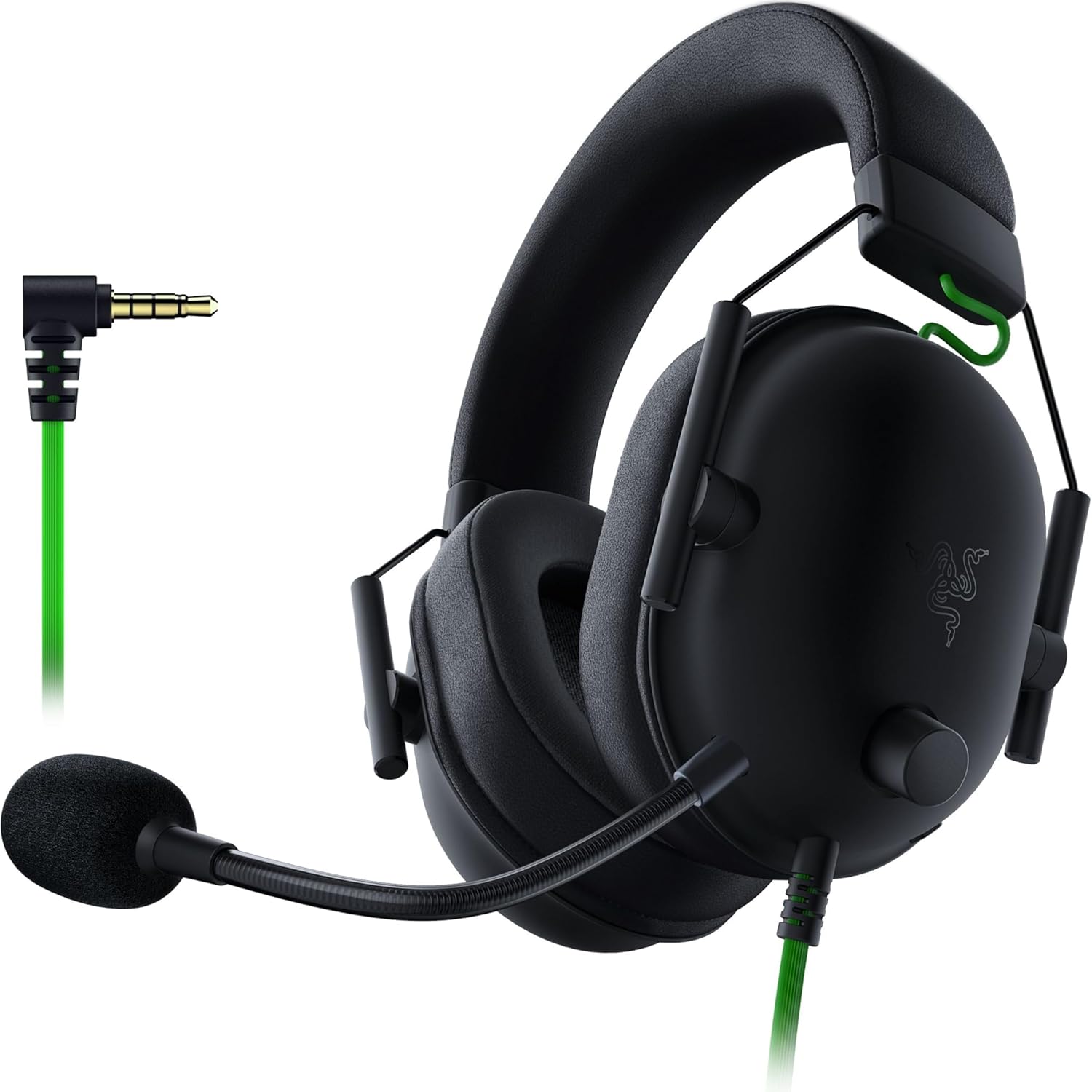
Consider the BlackShark V2 X if you want an over-ear headset that also serves gaming and you have a suitable 3.5 mm connection. This guide covers the V2 X with a 3.5 mm plug, not the USB version, V2 or V2 Pro.
A 3.5 mm jack is a round audio connection. To use both headphones and microphone, the computer’s socket must support both; a computer with separate sockets may need a suitable splitter. Dell illustrates combined headset sockets and separate headphone/microphone connections.
One reason to investigate the Razer for calls is the availability of microphone tests. RTINGS’ review of the 3.5 mm V2 X is favorable about voice pickup and longer-session comfort, while noting inconsistent sound delivery and concerns about the feel of some components.
Tom’s Hardware described its recorded voice as somewhat quiet and nasal, with a mute-button sound entering the reviewer’s recording. These observations set more realistic expectations; they are not a controlled comparison with the Poly or Logitech models.
According to Razer, the V2 X uses 50 mm TriForce drivers and passive isolation. A driver is the part that produces sound. Passive isolation uses the cushions and physical fit to block some outside sound, unlike electronic ANC. Software-enabled 7.1 simulates sound from different directions for entertainment; it does not itself prove clearer Zoom calls.
If you want a direct USB connection or integrated app-based call controls, return to the USB options. For someone using a gaming system and a laptop with a suitable combined headset socket, the Razer has a distinct role.
If a detachable microphone matters: the black JBL Quantum 100M2 is another 3.5 mm option for work and gaming. JBL lists a removable microphone and fabric-covered cushions. PSX Brasil tested a unit supplied by JBL, liked its light feel and comfort, but considered the microphone a weakness. Its design and removable mic are the reasons to consider it here; that review does not establish better call quality than the Razer. Check that your connection supports both headphones and microphone.
Five checks before choosing a wired headset
1. Check the complete connection path

Look at the ports on the computer you use for meetings, the headset’s plug and the accessories in the box. A dock or adapter between them is also part of the connection path.
For USB, choosing the right A/C plug can simplify setup. For 3.5 mm, check whether the socket accepts a microphone or only outputs sound. A headset that plays music normally may still fail to send your voice to the right app if the socket, accessory or setting is unsuitable.
Example 1 — a freelancer with a USB-C-only laptop: you spot a good price on the USB-A H390. Compare the H391 with the total cost of the H390 plus a suitable adapter. If you do not need a USB-A computer, the right plug from the start may keep your setup simpler.
The scenarios in this guide are hypothetical examples for applying the criteria.
2. Check call controls in the actual meeting app
Hearing and speaking are the basic audio functions. Whether headset controls answer calls, end them or change the app’s mute state also depends on the device and platform.
Zoom explains device checks and “Sync buttons on headset”. If you are buying for a particular control, verify the model, operating system and application version.
Example 2 — a consultant using Zoom on a Mac: you want a button on the cable to change Zoom’s microphone icon too. Verify synchronization for that setup. Where evidence is incomplete, rely only on the confirmed audio functions and check the controls in a test call.
3. Separate the noise you hear from the noise your client hears

“Noise cancelling” can refer to different parts of a headset. Ask whose listening experience you want to improve.
| What you want to improve | What to investigate |
|---|---|
| You want to hear less surrounding noise | ANC, cushion seal and fit |
| You want the client to hear your voice more clearly | Microphone noise reduction, mic position and background-noise processing |
| You want the design to physically block outside sound | Passive isolation and cushion fit |
A noise-reducing microphone helps reduce background sound entering the call so the other person can hear your voice more clearly. It does not itself make your listening space quieter. Jabra’s whitepaper separates these mechanisms, while Bose explains how ANC and physical isolation work together.
Example 3 — working in a room shared with family: difficulty hearing over a steady fan is a different problem from a client clearly hearing someone beside you. The Zone’s ANC is a reason to investigate it for your listening side; microphone handling of nearby voices still needs separate evidence.
A technology label on a sales page does not tell you how much of a particular noise will be reduced. Prefer tests in circumstances close to your own room.
4. Check comfort and cable position
Weight is useful information, but comfort also depends on cushions, clamping force, ear size and glasses. A cable pulling to one side, an easily snagged control or a microphone that is hard to position can also interfere with a long call.
Picture the whole working day: do you sit still or often stand up? Do you turn toward a second screen? Would you like to rotate the boom out of the way?
Example 4 — someone wearing glasses through several meetings: if your outer ears already feel squeezed, a lighter model may not solve it. Try the cushion style, assess comfort through a typical session and check return conditions. A review can identify things to try, but cannot establish fit for your head and glasses.
5. Pay for a function you will actually use
A price difference matters when it solves a real problem: a more suitable connection, easier controls, ANC or another use such as gaming.
Example 5 — a freelancer who works and games: if your computer already has a working combined headset socket, a 3.5 mm Razer may cover both needs. If you prefer a direct USB connection for the laptop or need synchronized call controls, consider the USB group first. Start with how you will use it rather than the feature count on the box.
Likewise, if your room is quiet and your existing headset works, check setup before increasing the budget.
A five-minute setup check before a client call
- Connect the headset through the connection path you intend to use.
- Select the correct microphone and speakers in both the operating system and meeting app.
- Use the microphone test to record normal speech and listen back. Follow the model’s guidance for input level and microphone position.
- Test mute/unmute and the state displayed in the app.
- Make a short test call in conditions close to your normal workspace. Ask the listener about clarity and background noise.
- Check the cable, cushions and glasses in your usual working position.
A local recording can reveal a wrong device or level; a test call also checks sound after it passes through the meeting app. Resolve connection and setup problems before deciding that you need another headset.
Once hearing and speaking work well, our AI meeting assistant guide for startups can help if you still need support with notes and follow-up.
A short checklist before buying

| Item | Confirm before buying |
|---|---|
| Work | Main meeting app, wearing time and need to move around |
| Connection | USB-A, USB-C or 3.5 mm; any dock or adapter required |
| Exact version | Model, configuration identifier, plug and included accessories |
| Noise | Are you hearing noise, is the client hearing it, or both? |
| Controls | Mute, answer/end-call and support in your app |
| Comfort | On-ear or over-ear cushions, glasses, clamping and cable position |
| Total cost | Current price, missing accessories, replacement cushions and return conditions |
Fill this in before buying. It also helps you spot a sales page with the same family name but a different plug or version.
Wired headset FAQ
Is USB-C better than USB-A for a headset?
The plug alone does not establish listening or recording quality. Choose the connection that fits your computer, then consider the microphone, comfort and call-related functions. If you move between computers, check adapters and included accessories too.
Does a noise-cancelling microphone mean the headset has ANC?
The terms describe different effects. Microphone noise reduction serves the person receiving your audio; ANC reduces noise the wearer hears. Match the feature to the problem and read the model’s limitations.
Should I choose a UC or Microsoft Teams version?
For office headsets, UC generally identifies a version intended for multiple communication platforms. MS/Teams identifies a configuration with Teams integration or certification. Jabra’s FAQ illustrates the distinction.
Choose for your main platform and the controls you need. Do not transfer a business version’s certification to a retail version with the same name or assume the Teams label proves a better microphone.
A platform-specific alternative: for the 2025 Jabra Evolve2 30 SE stereo USB-C/A configuration, distinguish the UC version, 23189-989-879-01, from the Microsoft Teams version, 23189-999-879-01. Jabra’s technical sheet lists them separately. Consider UC for multiple platforms, or investigate MS integration if Teams is your main app. Still verify controls on your own machine. Teams certification does not itself prove better microphone quality than UC; these are two variants of one secondary option.
What is the best USB headset for Zoom meetings?
In a quiet room on a basic budget, start with the H390/H391 and choose the right plug. Consider the Poly for the A/C package and office controls, or the Zone for wearer-side ANC. The best USB headset for video conferencing depends on those needs and the controls supported on your actual computer; Zoom is one part of the setup.
Choose a branch, then check the exact version
The H390/H391 is a starting point for low cost and the right plug. The Poly 3220 adds an office-oriented A/C option. The Zone Wired 2 addresses wearer-side ANC, while the Razer V2 X opens a work-and-gaming branch.
Choose the group closest to your desk setup, read its trade-offs and check the exact linked version. A useful choice supports your real calls, fits comfortably and makes everyday controls convenient.